Netskope update
Public updates from vendor feeds, with related items from the same catalog.
Here is the list of the new features and enhancements.
Agentic Broker for securing MCP Communications
Agentic Broker RTP & Skope IT enhancements for Securing MCP Communications
You can now apply real-time protection policies to secure your Model Context Protocol (MCP) traffic in a dedicated RTP page with support for specific MCP server(s), MCP Server Category covering MCP servers in the MCP Servers Catalog or Any MCP Traffic. This release extends existing Agentic Broker capabilities that provide MCP activity visibility in SkopeIT by supporting addition relevant MCP activities in the Application Events and additional data in the Application Events Details. See Agentic Broker Dashboard for Securing MCP – Netskope Knowledge Portal to learn more.
AI Guardrails On Demand – Netskope Hosted
AI Guardrails On Demand – Netskope Hosted is offered as a service hosted by Netskope. It allows you to scan AI prompts and responses in real time against the current detection engines using REST APIs from your existing AI Gateways or AI Agents directly and then conduct enforcement using your existing infrastructure.
To learn more: AI Guardrails On Demand.
AI Guardrails On Demand – User Hosted
AI Guardrails On Demand – User Hosted is offered as a VM that can be deployed in your on-prem and VPC environments. It allows you to scan AI prompts and responses in real time against the current detection engines using REST APIs from your existing AI Gateways or AI Agents directly and then conduct enforcement using your existing infrastructure.
To learn more: AI Guardrails On Demand.
Risky URL Detection
AI Guardrails now supports two new predefined categories: Malicious URL Detection and Newly Registered and Observed Domains. These categories support the following detections within prompts and responses:
-
Malicious URLs including phishing links, command and control, malware call-home, and malware distribution points.
-
Newly observed domains.
-
Newly registered domains
You can block or set alerts for these prompts and responses using an AI Guardrails profile in a Real-time Protection policy or an AI Gateway policy.
To learn more: AI Guardrails Profile.
False Positive Reporting
You can now submit false positives (FPs) for AI Guardrails detection directly from the Netskope UI without creating a support ticket. This reduces the operation overhead and resolution time for AI Guardrails FPs.
This enhancement includes the following capabilities:
-
FP submission from the AI Guardrails incident details.
-
The status of FPs submitted from the Netskope UI.
-
Rest APIs to submit and query the status of FPs.
To learn more: Reporting False Positives for AI Guardrails.
Infinite Streaming Request and (text) Response Inspection Handling
Netskope now inspects long-running streaming responses from AI applications applying DLP, threat, content inspection and moderation policies in real time without disrupting the user experience. When enabled, content is inspected progressively in windows as it streams, and any policy violation terminates the session immediately. When not enabled, streaming responses are not inspected.
Support for Canvas & Codex (Agent) in ChatGPT
Netskope now provides a dedicated app connector for ChatGPT Codex, OpenAI’s AI coding agent, delivering granular visibility and control over Codex activities such as logins, chats, file uploads, custom instructions, and MCP server installations. This enables administrators to apply DLP, threat protection, and AI security policies that prevent sensitive data exposure and govern developer use of the coding agent.
Background Traffic Filter
The Background Traffic Filter, part of Netskope’s Universal Connector and genAI Traffic Inspector,
now automatically distinguishes automated background traffic from genuine user-initiated activity.
This significantly reduces false-positive DLP and policy events, delivering cleaner
and more actionable incident data.
Endpoint DLP-Based Anomaly Detections for Advanced UEBA
Insider Threat and Advanced Compromise (i.e., Advanced UEBA) adds 18 more policies for Endpoint DLP-based anomalies that impact User Confidence Index (UCI). They are enabled by default and visible in the Policies menu if you have Endpoint DLP.
These new Endpoint DLP anomaly policies are outlined below, and you can find them using the Endpoint tag in the menu.
Print Activity
-
Spike in printed data: Detects when a user or organization prints an unusually high volume of data (bytes), regardless of sensitivity. It can indicate bulk data exfiltration via hardcopy.
-
Spike in printed files: Detects when a user or organization prints an unusually high number of files, regardless of sensitivity. Captures cases where many small files are printed.
-
Spike in printed sensitive data: Detects when a user or organization prints an unusually high volume of DLP-matched data. Higher-confidence signal that sensitive content is being exfiltrated via print.
-
Spike in printed sensitive files: Detects when a user or organization prints an unusually high number of DLP-matched files. Catches bulk printing of classified documents.
-
Spike in blocked print data: Detects unusual volume of data in blocked print attempts. Indicates repeated attempts to circumvent print controls.
-
Spike in blocked print files: Detects unusual count of blocked print attempts. Repeated blocked attempts suggest intentional policy evasion.
-
Spike in blocked sensitive print data: Detects unusual volume of sensitive data in blocked print attempts. Signals a user actively trying to print protected content despite policy enforcement.
-
Spike in blocked sensitive print files: Detects unusual count of sensitive files in blocked print attempts. Strong signal of intentional exfiltration attempts via printer.
USB/Bluetooth Transfer Activity
-
Spike in data transferred to removable media: Detects unusually high volume of data transferred to USB or Bluetooth devices. Baseline indicator of potential data hoarding on portable storage.
-
Spike in files transferred to removable media: Detects unusually high number of files transferred to USB or Bluetooth. Catches bulk file copying even when individual files are small.
-
Spike in sensitive data transferred to removable media: Detects unusual volume of DLP-matched data copied to USB/Bluetooth. High-confidence signal of sensitive data exfiltration via removable media.
-
Spike in sensitive files transferred to removable media: Detects unusual count of DLP-matched files copied to USB/Bluetooth. Catches targeted collection of classified documents onto portable devices.
-
Spike in blocked data transfers to removable media: Detects unusual volume of data in blocked USB/Bluetooth transfer attempts. Indicates persistent attempts to move data to external devices despite controls.
-
Spike in blocked file transfers to removable media: Detects unusual count of files in blocked USB/Bluetooth transfers. Repeated blocked attempts suggest deliberate policy circumvention.
-
Spike in blocked sensitive data transfers to removable media: Detects unusual volume of sensitive data in blocked removable media transfers. Strong indicator of attempted exfiltration of protected content.
-
Spike in blocked sensitive file transfers to removable media: Detects unusual count of sensitive files in blocked removable media transfers. User is actively trying to exfiltrate classified files to USB/Bluetooth despite policy blocks.
Device Anomaly
-
Unusual device ID access: Detects when a USB mass storage device, printer, or network file share that hasn’t been seen before is accessed. It can indicate a rogue device introduced into the environment or credential misuse via unfamiliar hardware.
-
First access for USB device type: Detects when a user connects a category of USB device they’ve never used before (e.g., first time using Mass Storage). Signals a change in behavior that may precede exfiltration.
SOC Detections Pack: Remediation Action for Suspected C2 Domains
To accelerate remediation for suspected C2 domains detected by the C2 detection policies in the SOC Detections pack for Insider threats and Advanced Compromise, Netskope created a new system generated destination profile called SOC Detections – Suspected C2 domains.
When policies in the SOC detection pack identify a suspicious domain in the Netskope tenant, it’s automatically added to a tenant-specific destination profile called SOC Detections – suspected C2 domains.
You can optionally:
-
(Recommended) Create clone or create a copy of the new destination profile to edit and curate the domains as needed for your inline policies and block them.
-
Use this system-generated destination profile directly in new inline policies to block these suspicious domains.
Adding Long-tail “Generate AI” Apps in Real-time Protection Policies
Netskope now includes long-tail Generative AI applications in the Real-time Protection (RTP) policy rules dropdown, enabling users to apply granular security controls to emerging GenAI tools without creating custom applications. This enhancement simplifies policy management and ensures comprehensive coverage of the rapidly expanding GenAI landscape.
Domain Remap
The domain logmein.com will be remapped from the application LogMeIn Pro to LogMeIn.
Domain Addition Request for Anthropic Claude
Category mapping change for claude.com and anthropic.com domains.
We are updating the Cloud App classification for Home \ Anthropic and Claude to align with Anthropic network-level access control with Tenant Restrictions requirements.
Key Changes:
-
Home \ Anthropic : Moving from the “Anthropic PBC” Cloud App (Technology category) to the “Anthropic Claude” Cloud App (Generative AI category).
-
Claude : Currently unmapped; it will now be added to the “Anthropic Claude” Cloud App (Generative AI category).
Action Required: Please review your existing category-based policies. Ensure that your “Generative AI” configurations account for these changes to prevent any unintended disruptions to end-user workflows.
RBAC and LBAC Support for DNSaaS
RBAC and LBAC support for DNSaaS feature allows companies to define global profiles containing everything that needs to be set at the company level, while each OU/Org maintains its own exclusion list that takes precedence and is evaluated first. This feature uses Label-Based Access Control (LBAC), Role-Based Access Control (RBAC), and 5 levels of policy inheritance.
DNSaaS – Global Profile with Local Override
This feature enables support for using Destination Profiles in a DNS profile, replacing the current domain lists used in Allowlist and Blocklist. It also introduces Inheritance Groups, allowing multiple DNS profiles to be added as Parent profiles, either Protected or Unprotected. DNS profiles within an Inheritance Group are evaluated in addition to the Child DNS profile from the matched Real-time Policy rule.
Support for Microsoft Purview Sensitivity Label Inspection on Embedded Files
Netskope DLP now extends Microsoft Purview (MIP) sensitivity label detection to embedded and nested files within containers and emails. Previously, label inspection and potentially decryption was limited to the top-level (parent) file only — meaning files within zip archives or documents embedded inside other documents (e.g., an Excel spreadsheet within a PowerPoint) were not evaluated for sensitivity labels.
DLP On Demand: DLP inspection in NS Public Cloud with Mgmt in NS MP Data Center
Netskope now offers DLP On Demand as a service hosted by Netskope, allowing organizations to use the DLP On Demand API to scan data through Netskope’s hosted service from their existing apps and workloads. These existing apps and workloads can then enforce verdicts that are returned from DLP On Demand.
Upcoming Detection Engine Changes in 141.0.0 Impacting Rules Concerning File Metadata
We are conducting engine maintenance as part of release 141.0.0, which includes updating an essential engine component primarily utilized for file type detection and content extraction. As part of this modification, certain fields such as “Author” and “format” as part of the extracted content from the document properties / metadata inspection will change.
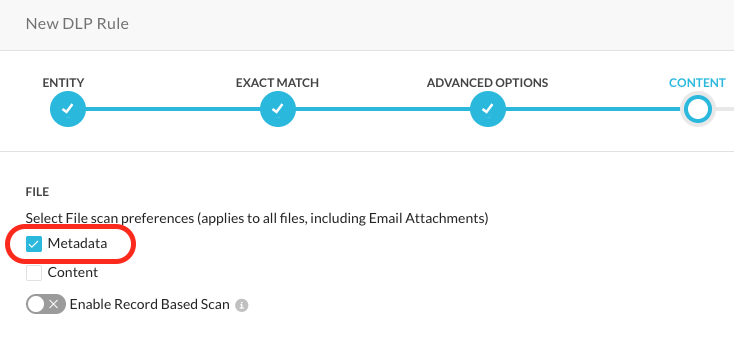
While we do not anticipate an impact, we highly recommend that users perform verification testing following the 141 deployment. Furthermore, this update will expand content detection capabilities, which may lead to the identification of additional context in some cases. This could potentially affect detection results and necessitate the optimization of Severity Thresholds within DLP Rules that govern policy action triggers.
Machine Traffic Detection With SMTP Proxy
Netskope Email DLP is enhanced to classify emails as either machine generated or human originated during inline inspection. This gives organizations more granular policy control and better visibility into automated traffic such as system notifications, alerts, and transactional messages.
If you are interested in performing DLP scans on machine generated traffic, please reach out to your account team.
Endpoint AI Security – Observability
Netskope Client on Windows and macOS now monitors network connections initiated by AI agents, including shadow AI agents and locally running LLMs; and reports this telemetry to the AI Command Center (AICC) for centralized visibility, without inspecting packet payloads. The Client identifies traffic to known public AI provider domains and to local AI listening ports, and periodically sends connection details (timestamps, ports, and byte counts) to the Cloud dashboard, helping security teams discover and monitor AI agent activity across managed endpoints.
Supported OS: Windows and macOS
Printing Intercept Architecture Improvements (PCCv3)
Printer Content Control v3 for Windows is supported in 140.0.0 as a beta feature. This changes how printed documents are evaluated. The changes include:
-
Browsers are no longer automated to evaluate content. The evaluation happens transparently to end-users.
-
Printing evaluation overhead is reduced, resulting in faster prints.
-
Many printer-format problems are fixed. This includes problems of misalignment of prints, label and badge printers, and large-format plotters.
Operating System (OS) as Policy Criteria
Client machine operating system can now be used as a policy criteria. This allows administrators to create policies that target Windows, Windows Server VDI, or macOS.
AVD/Citrix Server Support
Support is added for Windows Server (2019, 2022, 2025) and Windows 11 Enterprise Multi-Session. This is only supported for VDI use-cases (Citrix and Azure Virtual Desktop).
-
Network File Share Content Control only works for Windows Server 2025 and Windows 11 Enterprise Multi-Session. It is not supported on other multi-session operating systems.
-
Access to USB storage devices plugged into the Windows Server is not controlled.
-
There is no control for users logged into the physical console on the server machine. This feature supports users logged in remotely for VDI use-cases.
Extension Governance: Support for Self-Hosted Extensions
Netskope has extended its Extension Governance framework to support self-hosted extensions, a key management feature for privately hosted or internally developed Chrome extensions.
-
Manifest-Driven Registration: Admins can add custom extensions to any policy list (Allow, Block, or Force-Install) by simply providing its secure HTTPS update manifest URL. The platform automatically derives the unique extension ID and metadata, eliminating manual tracking errors.
-
Visual Identifiers & Security Alerts: Staged private extensions are visually tagged with a distinctive SELF-HOSTED badge and a generic icon. A persistent security note automatically displays in the policy editor when self-hosted entries are active to remind teams of their custom validation lifecycles.
-
On-Demand Updates: A manual Refresh button allows administrators to instantly re-query the external manifest file to sync name changes, asset paths, or new version configurations.
-
Built-in Guardrails: The validation engine automatically intercepts malformed configurations, insecure HTTP pathways, and loopback addresses to prevent Server-Side Request Forgery (SSRF) and infrastructure exposure.
Extension Governance Policies – Enhance Admin Operations
Extension Governance Policy Enhancements
Category: Enterprise Browser Policy | Version: 140.0.0 (Beta) Netskope introduced a pending-first administrative architecture for Enterprise Browser Extension Governance, mirroring Browser Protection’s staging workflow.
-
Pending-First Staging: Changes (create, edit, reorder, toggle, delete) are staged as pending and don’t affect active browsers until committed.
-
Visual Validation & Bulk Actions: A banner warns of uncommitted changes and links to a side-by-side comparison with status badges (Created, Edited, Deleted). Admins can perform bulk enable/disable/revert/delete on up to 100 policies. Reverting restores definitions but not rule priority positions.
-
RBAC Approval Flows: The UI reflects permissions: Manage/View roles can Send for Approval via email; Manage + Apply roles can Apply Changes directly, with an optional audit comment.
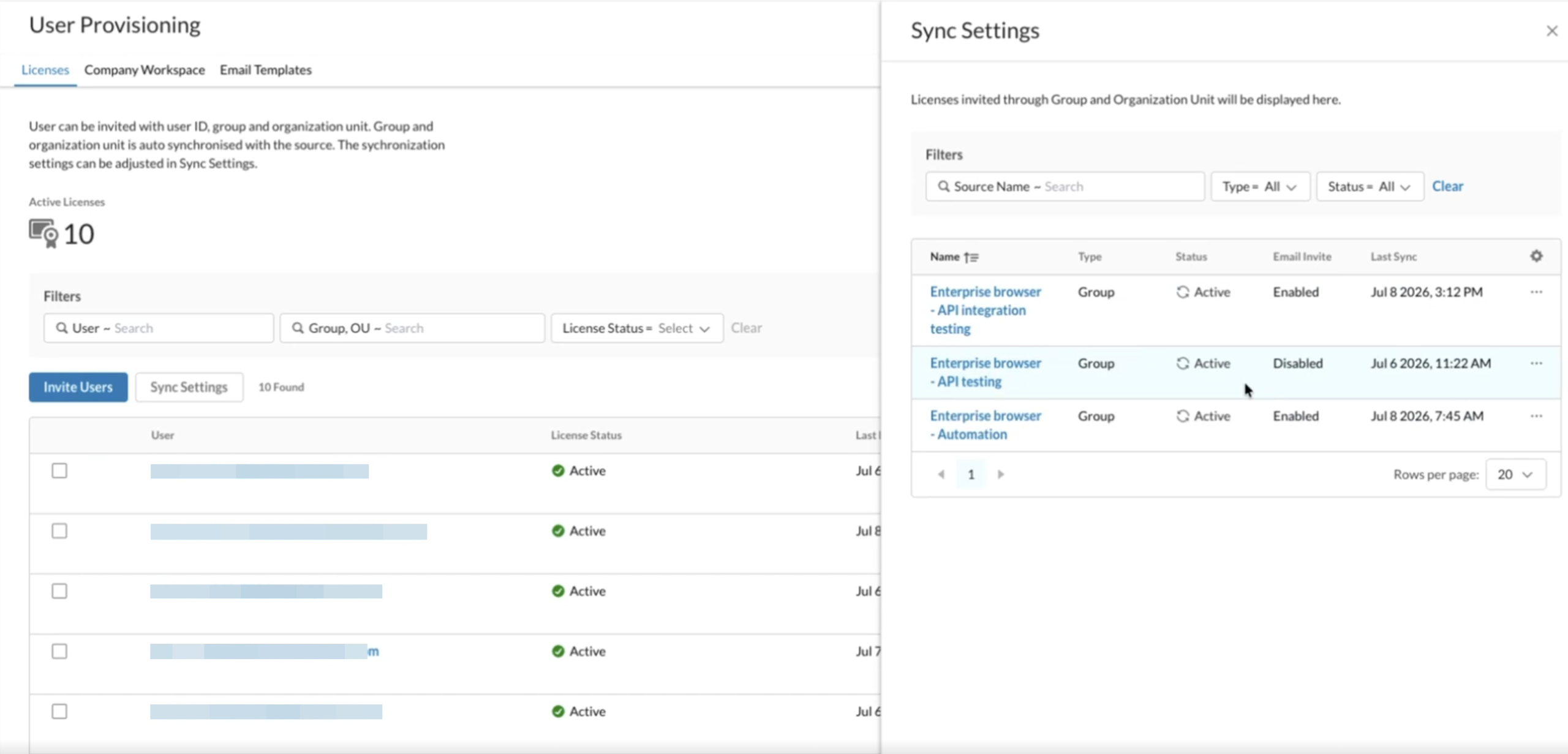
User Onboarding / Offboarding- License + Group Membership Syncing
Managing licenses manually for large browser deployments is error-prone and creates security gaps, especially during offboarding. Delays in revocation leave windows where former employees can still access secure environments.
This feature offers a governance-by-design approach by syncing Enterprise Browser (EB) license lifecycles with your Identity Provider (IdP) via SCIM. Using your SSO as the source of truth removes manual work and ensures access matches employment status.
Key Capabilities
-
Automated Onboarding: Users in designated IdP groups or OUs are provisioned with an EB license automatically, removing manual invites.
-
Instant Security Offboarding: Access is revoked immediately when a user is deactivated in the IdP, reducing risk from incidents or contractor departures.
-
Admin Dashboard: Under Settings > Enterprise Browser > User Provisioning admins can:
-
Select Groups or OUs to sync.
-
View a license’s provenance.
-
Pause or resume sync for sources.
-
-
Automated Email Invitations: Toggle whether new group-synced users receive onboarding emails.
Considerations and Scope
-
Scope: Available for Commercial Environments only. Compliance stacks (FedRAMP/PBMM) are out of scope for now.
-
Legacy Data: Users invited individually before this feature keep their “User Invitation” status and won’t be deactivated by group sync unless removed from the tenant.
-
Sync Latency: License update timing depends on your IdP’s SCIM sync interval.
-
Multi-Source Licenses: If a user is in multiple synced groups, their license stays active while any valid source remains. Manual admin revocation overrides group membership.
Cloud Firewall (CFW) Support for Android and ChromeOS
Netskope Client now supports Cloud Firewall and DNS Security modes on Android and ChromeOS.
With the All Traffic mode enabled in the Steering Configuration, these devices now steer non-web traffic including DNS traffic (DNS Security) to Netskope Cloud Firewall for policy enforcement, closing this gap.
Minimum Supported Client Version: 140.0.0
Client Support for Mobile in French (Canada)
The Netskope Client for iOS now displays its user interface in Canadian French (fr-CA).
This update helps organizations meet Quebec’s Bill 96 language requirements by letting end users view the Netskope Client interface in French instead of English.
Minimum Supported Client Version: 140.0.0
Supported OS: iOS
To learn more, view Multilingual Support For iOS.
New OS Support for Netskope Client
Netskope supports the following operating systems in version 140.0.0:
-
Ubuntu 26.04
-
Android 17
-
ChromeOS 150
Minimum Supported Client Version: 140.0.0
To learn more, view Netskope Client Supported OS and Platforms.
General Availability of Enhanced Selection for Golden Monthly Releases
Enhanced Selection for Golden Monthly Releases was earlier available as a Beta option in version 138.0.0. This is now available for all tenants.
The Upgrade Client automatically to a specific Client version option in the Client Configuration profile to include all supported monthly and golden releases, specifically adding visibility and access to hotfix (dot) versions.
To learn more, view Upgrade Client to a Specific release version.
General Availability of Auto Re-enable Netskope Client
Auto Re-Enable Duration in Client Configuration was available as a Beta option in version 139.0.0. This is now available for all tenants.
Using this option, administrators can now configure a timer in the tenant webUI so that when a user disables all Client Services, the Netskope Client automatically re-enables all services after the configured duration — without requiring any manual action from the user or the administrator.
Supported Operating Systems: Windows, macOS, Linux
Minimum Netskope Client Version: 139.0.0
To learn more, view Auto Re-enable Duration.
Remote Collection of Publisher Logs
Administrators and Netskope Support can now collect Publisher logs remotely from the Netskope Management interface, without needing to log in to the Publisher host. This simplifies NPA troubleshooting by enabling on-demand retrieval of Publisher logs directly through the UI.
NPA AI Agent for Generating App Segments and Policies
Netskope Private Access AIOps Agent now supports the capabilities to generate narrow Application Segments and associated Real-time policies for least privileged access.
NPA KSA MP – Support Out of KSA PoPs
For eligible Kingdom of Saudi Arabia (KSA) tenants, NPA can be configured, as an opt-in capability that is disabled by default, to allow users to connect to, and have policy enforced at, the nearest Point of Presence (PoP) outside KSA. Tenant configuration data-at-rest continues to reside in KSA; only in-transit processing occurs at the non-KSA PoP. This improves connectivity and performance for KSA users while preserving data-residency requirements. Contact Netskope Support to enable this capability for your tenant.
Process Name and Parent Process Name in RTP and SSL Policies
Netskope now provides granular policy controls based on the Process Name and Parent Process Name for traffic steered through the Netskope Client. Administrators can create security rules that target the exact application or background process initiating a network request.
Key Capabilities:
-
Contextual Enforcement: Define Real-Time Protection (RTP) and SSL Do-Not-Decrypt policies that trigger only when a specific process (for example, curl.exe) or its parent (for example, powershell.exe) is detected.
-
Deep Visibility: Catch rogue scripts or unapproved apps trying to reach the internet, even when their traffic bypasses inspection.
-
Forensic Logging: View process and parent process names in SkopeIT Transaction Events to trace which application on a device generated a specific request.
Scope and Requirements:
-
Access Method: Exclusively supported for traffic steered via the Netskope Client.
-
Supported Policies: Available for RTP and SSL Bypass lookups.
-
Beta Enablement: This feature requires a per-tenant feature flag to be enabled in the Web UI.
Information Icon on the Tenant URL Lookup Page
Netskope now shows an information icon on the URL Lookup page when you search a common domain. It reminds you that the category shown is a lookup result, not live traffic; actual categorization of real-time traffic may differ.
Exclude Groups, Organizational Units, and Countries in SSL Decryption Policies
Administrators can now exclude specific user groups, organizational units (OUs), or countries when creating SSL decryption policies. This capability, previously in beta, is now generally available. This feature is behind a feature flag.
With this update, administrators can:
| Capability | Description |
|---|---|
Negate User Groups / OUs | Exclude specific groups or OUs from a policy instead of only being able to include them. |
Source Country matching | Evaluate or exclude traffic based on the client’s source country. |
Conflict prevention | The policy editor blocks you from selecting the same entity for both inclusion and exclusion lists. |
File Hash, Object ID, and Password Protection Now Built Into RTP File Profiles
Netskope has simplified file access controls. You can now configure advanced file attributes directly within Real-Time Protection (RTP) inline policies. This removes dependency on attached DLP or Threat Protection profiles.
What you can do now
You can build centralized file profiles using:
-
Cryptographic file hashes — MD5 and SHA256, with bulk CSV import so you can upload large hash lists in one step.
-
Encryption state — detect whether a ZIP, PDF, or Microsoft Office document is password-protected.
These profiles apply directly to standard web transactions and cloud app traffic — including Box, Google Drive, and ChatGPT — for files up to 256 MB (or 400 MB with Large File Support enabled).
How it works
These attributes are evaluated natively by the inline proxy engine instead of being sent to Threat Protection services, so inspection is faster.
One limitation to know: File hash validation isn’t supported for partial downloads.
Clear Placeholder Text for Redirect Policy URLs
The placeholder hint in the Redirect action field now includes the http:// scheme so it’s not mistaken for a relative path.
SkopeIT Events Now Show Agent Type and Capabilities
SkopeIT audit logs now automatically populate Agent Type and Agent Capabilities attributes on application events and policy alerts.
This gives your security team the context to see, right from the event details panel, which AI system or automated agent initiated a web transaction — and to verify what permissions that agent had at the time.
URL Fields in Event Logs Are Now Capped at 6 KiB
To keep event payloads manageable, URL-type fields in app, alert, and transaction events are now capped at 6 KiB.
If a URL exceeds that limit, it’s truncated at the nearest complete character — so you never see a broken or partial glyph — and a suffix showing the original length is appended, for example:
Access Review for Microsoft 365 SharePoint
Next Generation API Data Protection has introduced Access Reviews, a policy-driven workflow that helps administrators identify over-shared Microsoft 365 SharePoint sites, notify site owners to remediate, and track resolution at scale. When a SharePoint site’s exposure matches a configured policy, Next Generation API Data Protection opens an access review event and emails the site owner. An optional follow-up action — Restrict Access, or Revoke Access runs automatically after a specified number of days if the exposure persists.
In the screenshot below, the policy identifies 
 top-level SharePoint sites that is shared
  externally or anonymously and initiates a staged remediation workflow. When the policy is triggered, an
  Access Review notification is sent to the site owner. If the exposure remains unresolved after seven days, access is automatically restricted to
  internal users, helping reduce the risk of unintended data exposure.
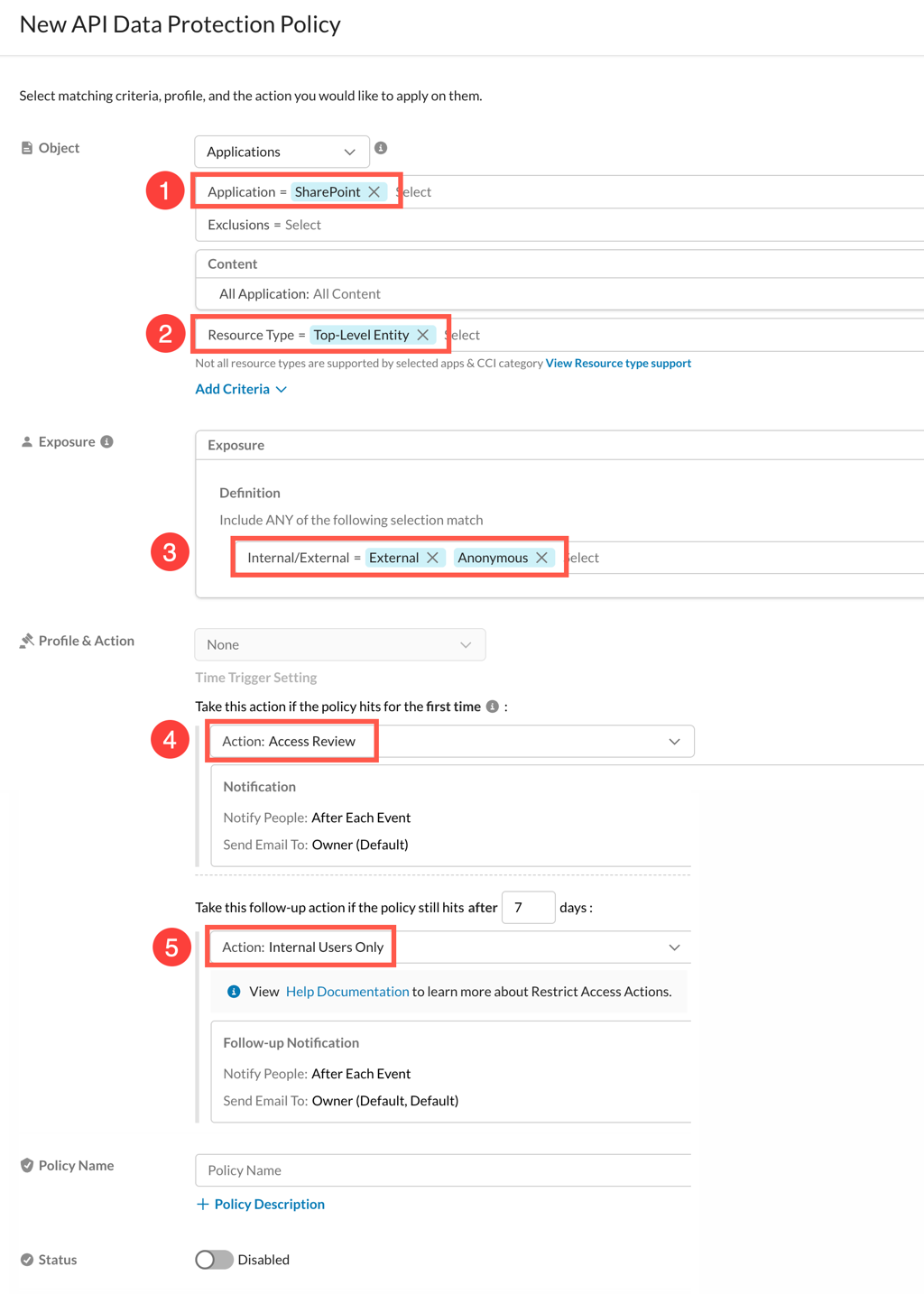
To configure a policy with access review action, see see Create a Next Generation API Data Protection Policy.
The new Access Findings page under API-enabled Protection > CASB API (Next Gen) provides a centralized view of all open and closed access reviews, with per-review details including assignee, severity, matched policy, object count, exposure, and scheduled follow-up date.
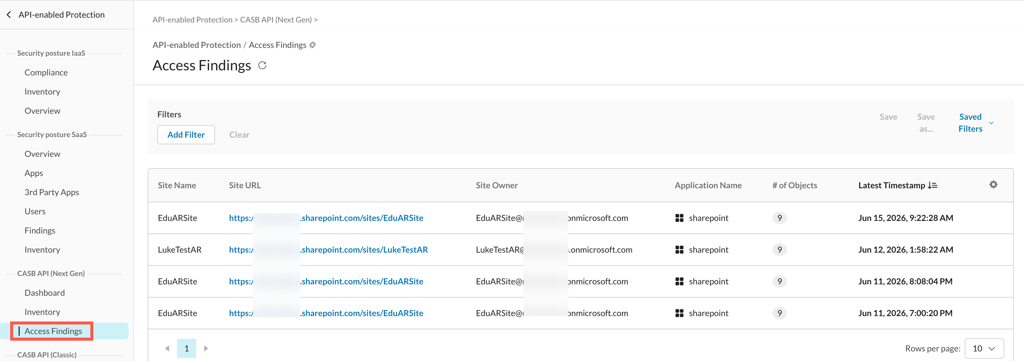
Access reviews close in one of two states: Resolved (manual closure or site owner remediation) or Auto-Resolved (Netskope follow-up action). Closing a review with a justification excludes the site from future reviews for that policy.
To learn more about the Access Findings page, see Next Generation API Data Protection Access Findings.
Bring Your Own Project (BYOP) for Google Apps
Google is introducing usage-based charges for Google Workspace API calls. To protect your Google Workspace scanning from any shared quota limitations and give you full control over your own API usage, Netskope is moving Next Generation API Data Protection for Google apps to a Bring Your Own Project (BYOP) model. Under this model, you create and own the Google Cloud Platform (GCP) project used for your Google Workspace integration, instead of relying on a project that Netskope owns and shares across users.
To learn more: Bring Your Own Project (BYOP) for Google Apps.
Audit Event Support for Gmail
Next Generation API Data Protection now polls Audit events for Gmail, giving you visibility into administrative and user activity for your Gmail environment.
Important Points to Note
-
This feature requires the
https://www.googleapis.com/auth/admin.reports.audit.readonlyscope. -
New Gmail instances must grant this scope during setup.
-
Existing instances must regrant their instance to add this scope and start receiving Gmail audit events. If you do not regrant, Gmail audit events will not be available for your instance.
To learn more, see Configure Gmail for Next Generation API Data Protection.
Isolation Watermark for URP and RBI
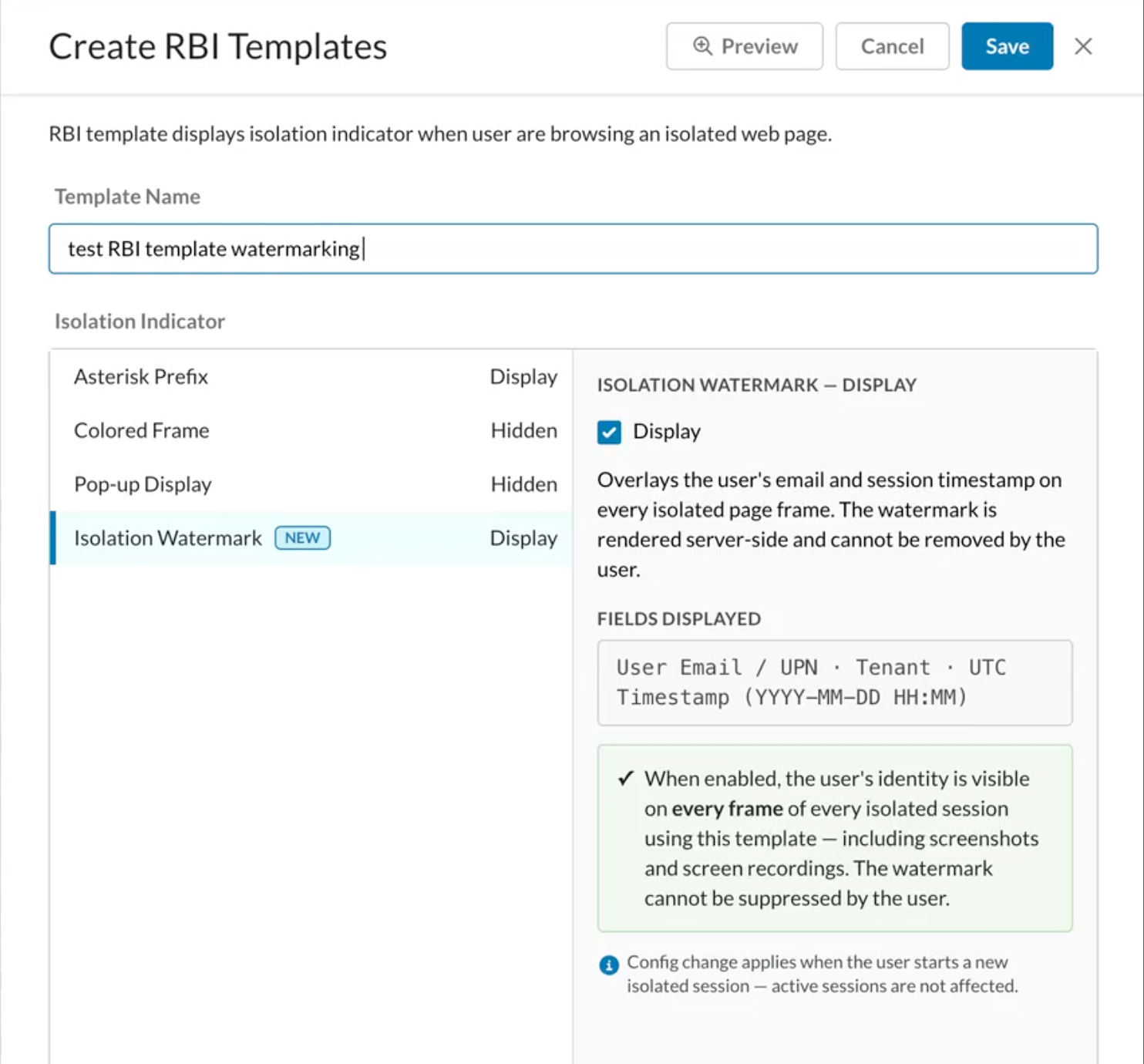
This feature adds an Isolation Watermark toggle to RBI Templates (Settings > RBI Templates > Isolation Indicator), overlaying the user’s Email/UPN, tenant ID and a UTC Timestamp onto isolated sessions.
Isolation Watermark deters data leaks via screenshots or photos on Managed devices, BYOD and contractor endpoints accessing corporate data.
The watermark is composited directly into the server-side pixel buffer and cannot be bypassed or removed via browser Developer Tools (DevTools) or extensions.
This lightweight overlay consumes negligible rendering overhead (less than 0.5ms per frame) to prevent performance stutter.
SSPM Now Available in FedRAMP High and PBMM Environments
Netskope SSPM is now supported in FedRAMP High and PBMM compliance environments, bringing the same security posture management capabilities available in the commercial offering to federal and regulated users.
Known limitations at launch:
-
Alerts for Findings are not available at launch, as the Global Event Forwarder (GEF) is not yet deployed in the compliance environment.
Onboarding GitHub in Next-Gen SSPM
GitHub onboarding is now available in Next-Gen SSPM. For onboarding instructions, see Onboard GitHub.
-
New GitHub instances can no longer be onboarded from Classic SSPM.
-
Existing GitHub instances will continue to function in Classic SSPM but must be migrated to Next-Gen SSPM.
-
To complete the migration, see How to migrate Github instance from Classic to Next-Gen article.
Support for External Client Apps in Salesforce
Netskope SSPM now discovers External Client Apps in your Salesforce environment and displays them on the Third-Party Apps page alongside existing connected apps. See Permissions Required for Salesforce to grant the new permissions this discovery requires.
Expanded ServiceNow Visibility in SSPM
Netskope SSPM now retrieves web service operations, web service definitions, URL processors, ACL rules, and authentication profiles from ServiceNow, giving you fuller visibility into your ServiceNow security posture. See Access Required for ServiceNow to grant the additional permissions this visibility requires.
Scuba for M365 Compliance Standard Update
Added support for the latest version 1.8 of the CISA SCuBA baselines. Updated compliance mappings across Microsoft 365, Entra ID, Exchange Online, Defender for Office 365, Teams, and SharePoint/OneDrive.
See Supported Compliance Standards to know the list of supported compliance standards by SSPM.
Enhanced Predefined Rules and Templates
Recent updates for SSPM rules are as follows:
New Predefined Rules
5 new predefined rules are available with this release. It covers the following categories:
-
Apps:
-
Zoom: 5
-
-
Updated Rules:
-
Azure AD: 53
-
Box: 4
-
GitHub: 4
-
GoogleWorkspace: 7
-
Microsoft365: 121
-
Okta: 4
-
Salesforce: 21
-
SlackEnterprise: 2
-
Zoom: 3
-
Go to the Rules UI page to review the specific updates to the rules. See Security Rules for more details.
New Advanced Threat Indicators for Malware Incidents
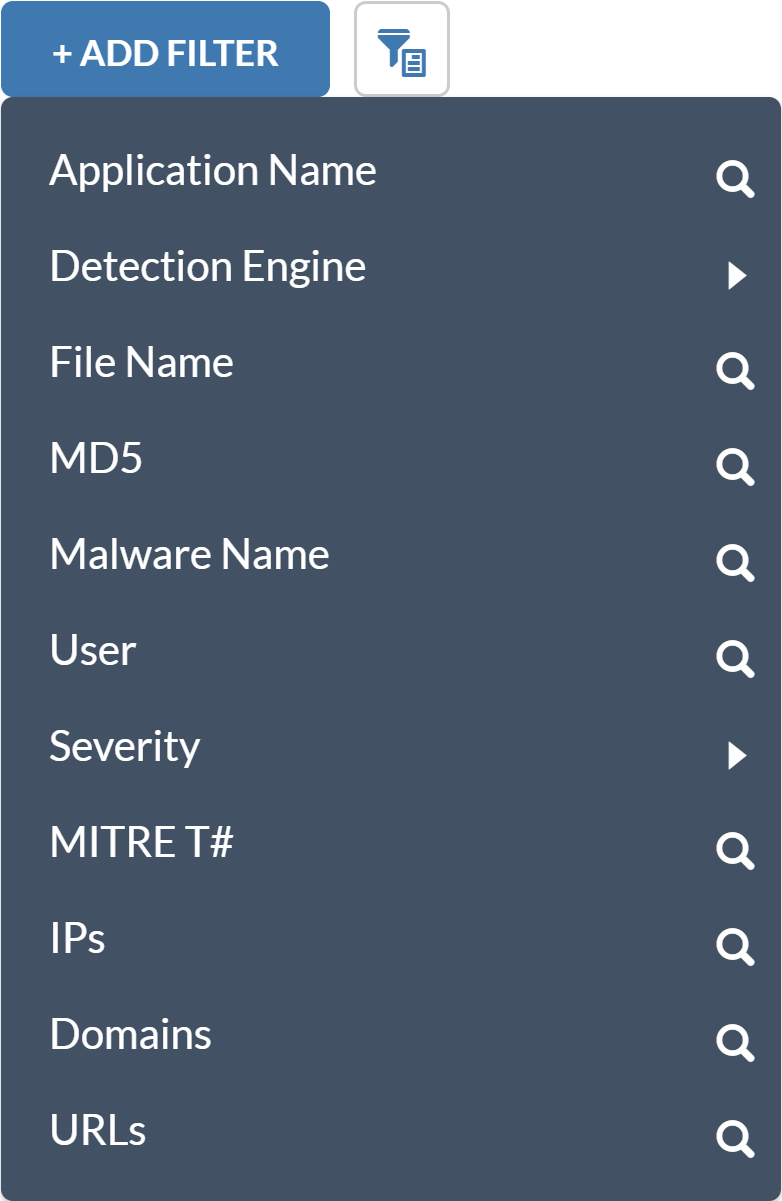
There are new malware alert fields in Malware incidents that enable you to view and search for MITRE TTPs (T#) as well as IPs, domains, and URLs collected from the Threat Protection analysis of the file.
To learn more: Skope IT Queries Library.
Modernizing Netskope’s WebUI
This is a zero-impact change. Every updated page preserves existing behaviors, permissions, and data flows. Existing backend data models, authentication flows, and API contracts remain completely intact. All login processes—including authentication, SSO, bookmarks, integrations, and credentials—will continue to work as-is. This is strictly an update to the user interface, not a migration of your data, configurations, or core functionality.
App Definition Cloud Apps UI Update
The App Definition Cloud Apps page (Settings > Security Cloud Platform) has been migrated to Netskope’s Next-Gen WebUI, delivering a faster, more consistent, and modern experience for managing cloud application definitions. The migration preserves existing functionality while aligning the page with the redesigned Netskope admin console.
SkopeIT Apps UI Update
The SkopeIT Applications > Instances page has been migrated to Netskope’s Next-Gen WebUI, delivering a faster and more consistent experience for viewing and managing application instances. Existing functionality is fully preserved on the modernized admin console.
Related updates
More recent public updates for Netskope.